Slide-Out Hamburger Menu - Free WordPress Plugin
HSArticle Foldout Menu is a free hamburger menu plugin for WordPress that adds a clean, accessible slide-out navigation panel to any theme. If your theme’s built-in mobile menu feels dated, conflicts with your header layout, or just doesn’t give you enough style control, this plugin adds an independent hamburger trigger and slide-out panel on top of your existing site – no shortcode required if you don’t want one, and no code editing at all. It works alongside your theme rather than replacing it, so your existing WordPress menus (Appearance → Menus) plug straight in.
What Is a Hamburger Menu Plugin, and Why Use One?
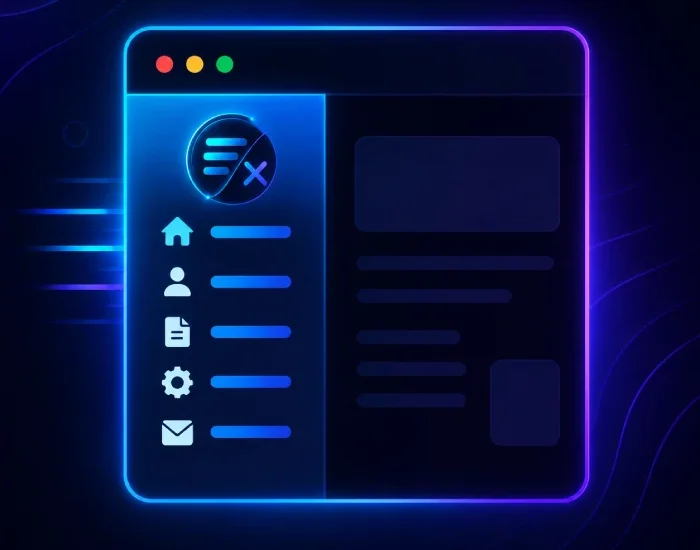
A hamburger menu – the three-line icon in the corner of most mobile sites – is the standard way visitors expect to open navigation on a phone or tablet. Most WordPress themes ship with a basic version, but it’s often rigid: fixed colors, no animation control, and sometimes awkward on non-standard header layouts. A dedicated hamburger menu plugin for WordPress like HSArticle Foldout Menu gives you a separate, fully stylable panel that works the same way regardless of theme, so you’re not stuck waiting on a theme update to fix a mobile navigation problem.
For background on how these plugins compare more generally, WordPress.org’s own plugin directory lists dozens of mobile and off-canvas menu options — HSArticle Foldout Menu is built for sites that want the essentials without a heavy settings panel (more on that below).
Two Ways to Add the Trigger Button
01
Shortcode placement
Drop [hsarfold_menu] into a widget, a page, or a header template, and the trigger button appears exactly there. Useful if you want the hamburger icon inside an existing header layout rather than floating.
02
Auto-add floating button
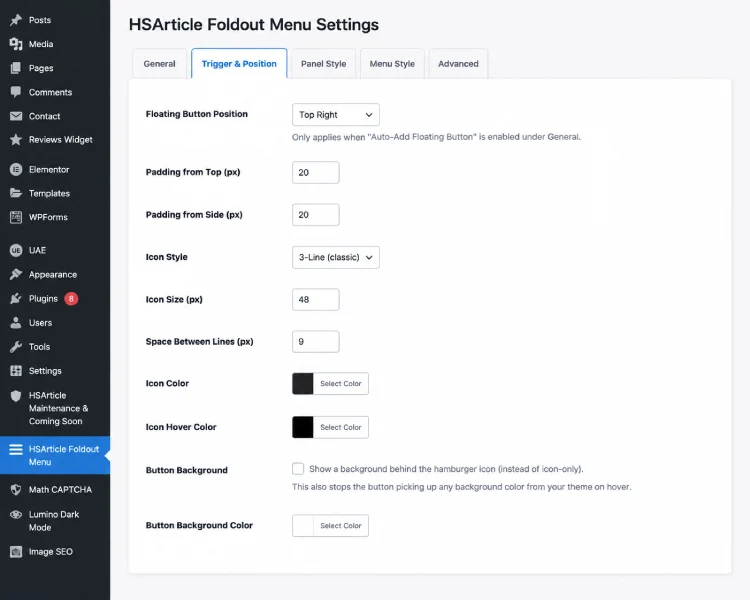
Turn on “Auto-Add Floating Button” in settings and the plugin places a floating hamburger icon in the top-left or top-right corner automatically, with adjustable padding — no template editing needed. This is the fastest path if you just want a slide-out mobile menu working in under a minute.
Full Off-Canvas Menu Customization, No Code Required
01
Panel behavior
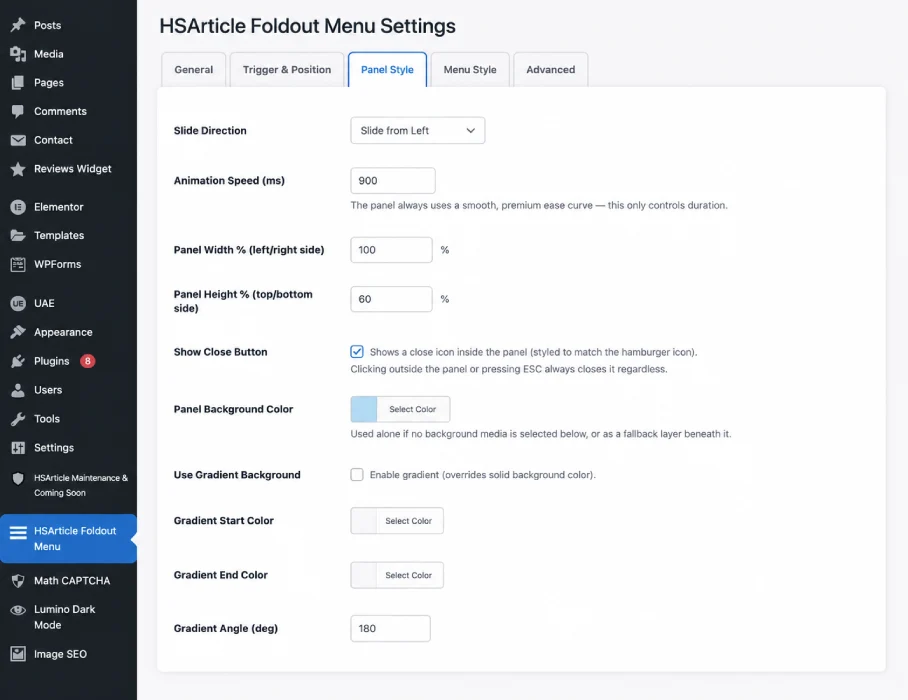
- Slide direction: left, right, top, or bottom
- Panel width/height as a percentage
- Background color or gradient
- Adjustable animation speed
- Optional dimming overlay with adjustable color/opacity
02
Menu and icon styling
- Choose any existing WordPress menu (Appearance → Menus) — no rebuild required
- Menu text font, size, color, and hover color/size
- Icon style: 3-line, dots, or plus
- Icon color, hover color, and size
- Close button style: X icon, text, or none (click-outside and ESC always work)
Because every option is exposed in the settings tab, you can match your slide-out panel to your brand colors and existing design without touching CSS — though custom CSS is supported if you want to go further.
Built to Not Break Your Site
- Every CSS class, ID, JS variable, and option name is uniquely prefixed — no conflicts with theme or other plugins
- Assets load only on the frontend when the plugin is enabled — zero bloat on pages that don’t use it
- Keyboard accessible: ESC closes the panel, focus is trapped inside while open, and returns to the trigger button on close
- RTL-ready
Accessibility is often the first thing older off-canvas menu plugins skip. Focus trapping and keyboard support aren’t cosmetic — they matter for WCAG compliance and for any visitor navigating without a mouse.
How to Install the Hamburger Menu Plugin
- Install directly through Plugins → Add New in wp-admin (search “HSArticle Foldout Menu”), or upload the plugin files to /wp-content/plugins/hsarticle-foldout-menu.
- Activate the plugin.
- Open the HSArticle Foldout Menu tab in your wp-admin sidebar.
- Check “Enable HSArticle Foldout Menu,” pick a menu to display, and adjust the settings.
- Place [hsarfold_menu] where you want the trigger, or enable the auto-add floating button.
Frequently Asked Questions
Does this work with any theme?
Yes. It doesn't touch your theme's existing header or navigation — it adds an independent panel and trigger button on top of your site.
Can I use my existing WordPress menu?
Yes, choose any menu you've already created under Appearance → Menus.
Will this conflict with my theme's mobile menu?
No. HSArticle Foldout Menu is fully independent and uses uniquely prefixed CSS/JS, so it won't override or be overridden by other menu styles.
Do I need to edit my theme files or add code?
No. Everything is controlled from the plugin's settings tab — no template edits, no custom CSS required unless you want it.
Is it accessible for keyboard and screen reader users?
Yes. The panel traps focus while open, closes on ESC, and returns focus to the trigger button when closed.
Does it slow down my site?
No. The plugin's CSS and JS only load on pages where the menu is actually enabled.
Is it free?
Yes, HSArticle Foldout Menu is completely free with no premium tier.
How is this different from a mega menu plugin?
Mega menu plugins are built for large, multi-level navigation with dropdown panels. HSArticle Foldout Menu is built for a single purpose — a clean slide-out trigger for mobile and simple navigation — so there's far less to configure.
Can I control which slide direction the menu opens from?
Yes. Choose left, right, top, or bottom in the Panel Style settings, along with animation speed and overlay dimming.
Is this a good hamburger menu plugin for WordPress beginners?
Yes. There's no code or shortcode requirement if you use the auto-add floating button option, and every visual setting is adjustable from a single admin tab.
Download Slide-Out Hamburger Menu - Free WordPress Plugin
WordPress Slide-Out Hamburger Menu is 100% free and open source. Download it directly from the official WordPress Plugin Directory.