
Every writer hits this question eventually. You finish a draft, look at the word count, and wonder if it’s too short to rank or too long for anyone to actually finish. Then you Google it, and get five different answers ranging from 800 words to 3,500.
The honest answer is there’s no single right number, but there is a real pattern once you stop asking “how long should a blog post be” and start asking a different question first: what job does this piece actually need to do? Rank for a competitive keyword, walk someone through a process, convert a visitor, or update a subscriber who’s already interested? The job decides the length range. Once you know that, the number stops being a guess.
How long should a blog post be? Most SEO blog posts perform well between 1,400 and 2,500 words, while tutorials often run past 1,800, listicles typically land between 1,000 and 1,800, and product pages usually only need 300 to 800. The right length depends on the content type and search intent, not a fixed word count.
The Short Version
If you just want a number to start with:
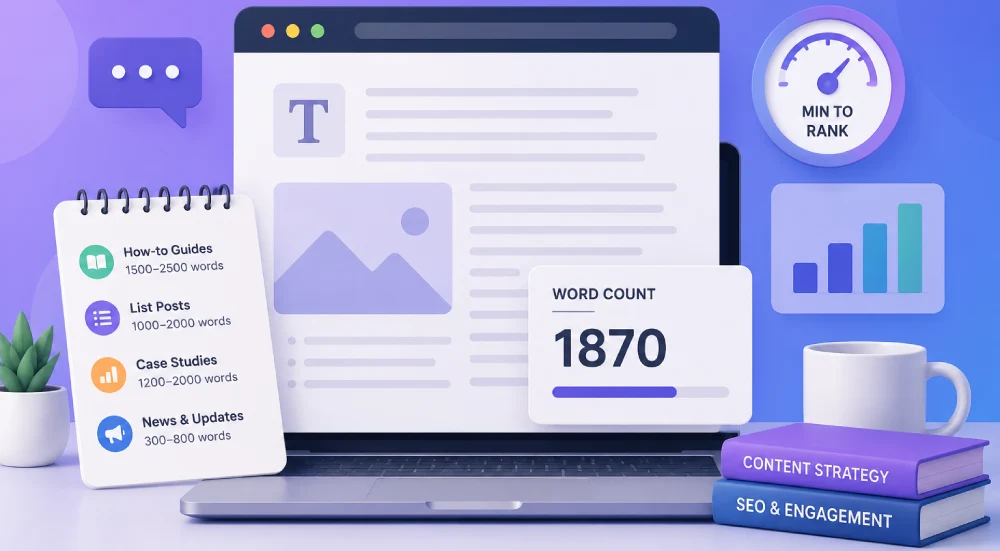
- Standard blog posts targeting Google rankings: 1,400 to 2,500 words
- How-to guides and tutorials: 1,800+ words
- Listicles and roundups: 1,000 to 1,800 words
- Case studies or original research: 2,000+ words
- Product descriptions: 300 to 800 words
- Landing pages: 500 to 1,500 words, depending on how warm your traffic is
- Email newsletters: 50 to 200 words for most sends
Here’s the same thing as a quick reference table, with an approximate reading time alongside each range so you can picture what that word count actually feels like to read:
Reading times above are rounded estimates at an average adult reading speed. Your own draft will vary depending on sentence length and complexity, which is exactly what a reading time calculator is useful for, more on that below.
Now the reasoning behind those numbers, because the number alone isn’t that useful without knowing why it holds.
Why the Word Count Debate Never Settles
Part of the confusion is that people keep citing “longer content ranks better” as if it’s a rule Google enforces. It isn’t. Google has never confirmed word count as a ranking factor. What the data actually shows is a correlation: pages that rank well tend to be longer, not because length itself is rewarded, but because covering a topic properly usually takes more words, earns more backlinks along the way, and keeps people on the page longer.
That distinction matters because it changes how you should use any benchmark. A large-scale analysis by Ahrefs and Backlinko, which looked at close to 12 million first-page-ranking posts, found the average sitting around 1,447 words. That’s a useful reference point, not a target to hit artificially. A sharp, well-targeted 1,200-word post that actually answers the question will beat a padded 3,000-word post on the same topic almost every time.
There’s also a newer wrinkle worth knowing about if you’re writing in 2026: content cited in Google’s AI Overviews skews shorter than people expect. One large Ahrefs study of over half a million AI Overview citations found the average cited page ran about 1,282 words, and more than half of all citations went to pages under 1,000 words. The correlation between length and getting cited was close to zero. If getting pulled into AI-generated answers matters to you, padding a post to hit a word count is working against you, not for you.
Word Count by Content Type
This is where most “ideal blog length” advice falls short. It treats every post like it’s competing for the same kind of search result, when a how-to guide, a quick news update, and a product page all have completely different jobs.
Standard Blog Posts (1,400 to 2,500 words)
This is the range most SEO-focused blog content lands in when it’s genuinely competing for a keyword. It gives you room for real subheadings, supporting examples, and enough depth that you’re not leaving obvious follow-up questions unanswered. Going shorter is fine for simpler queries; going longer only helps if the extra length is doing something, like a comparison table, an original example, or a section your competitors skipped.
How-To Guides and Tutorials (1,800+ words)
Instructional content almost always needs more room, because you’re walking someone through steps, giving context for why each step matters, and usually including screenshots or examples along the way. Thin how-to content is one of the most common reasons a guide underperforms. If you’re cutting steps short to hit a shorter word count, that’s usually the wrong trade.
Listicles and Roundups (1,000 to 1,800 words)
Lists work because they’re scannable, and that scannability actually caps how long they should be. Once each list item has a real paragraph of explanation, 1,000 to 1,800 words is usually enough to cover 8 to 15 solid points without the post turning into a slog. If you’re padding individual items just to hit a bigger number, you’re better off cutting weaker entries.
Case Studies and Original Research (2,000+ words)
This is one of the few content types where going long is almost always justified, because you’re presenting data, methodology, and takeaways that readers can’t get anywhere else. This is also the content type most likely to earn backlinks, since other writers cite original research constantly.
Product Descriptions (300 to 800 words)
Product pages have a completely different job: help someone decide to buy, not educate them on a broad topic. Standard products do fine around 300 to 500 words covering features, benefits, and practical details. More complex or expensive products can justify going up toward 800, mainly to answer objections a buyer would otherwise have to search for elsewhere.
Landing Pages (500 to 1,500 words)
Landing page length depends almost entirely on how much convincing your visitor needs before they arrive. If someone’s clicking from an email list or an ad tied to something they already want, a short page in the 500 to 800 word range that gets straight to the offer works better. If you’re bringing in cold traffic that’s never heard of you, going longer, sometimes well past 1,500 words, gives you room to build trust before asking for the click.
Email Newsletters (50 to 200 words)
This one surprises people the most, since blog instincts push toward “more is more.” Newsletter data tells a different story. Large-scale analyses from Mailchimp, Boomerang, and Marketo, covering tens of millions of emails, consistently land on shorter as better, with a sweet spot around 95 to 110 words for click-through rate. There’s also a practical 2026 reason to keep newsletters tight: a growing share of readers aren’t reading the email directly, they’re having it summarized by Gmail or an AI assistant, and short, clearly-headed emails survive that summarization far better than long ones.
How to Actually Check Your Own Draft
Knowing the benchmarks is only half the job. The other half is checking where your actual draft lands before you hit publish, which is a much faster gut check than re-reading the whole thing and guessing.
Paste your draft into a reading time calculator and you’ll immediately see your word count alongside how long it actually takes someone to read, at slow, average, and fast reading speeds. That second number matters more than people think. A 2,000-word post that reads as a comfortable 8-minute read is very different from a 2,000-word post so dense it reads like 12 minutes, even though the word count is identical. If your draft’s reading time feels mismatched with what someone would expect from the headline (a “quick tips” post that clocks in at 10 minutes, for instance), that’s usually a sign to cut, not a sign you’ve written enough.
It’s also a fast way to sanity-check the content types above without doing manual word counts. Paste a product description in and see if you’re at 400 words or 900. Paste a newsletter draft in and see if you’re at 150 words or 600. The reading time and word count come back instantly, so you can decide whether to trim before you second-guess the whole draft.
Quick Pre-Publish Checklist
Before you publish anything, run through this in about two minutes:
- What’s the actual job of this piece? Rank for a keyword, convert a visitor, or update a subscriber? The job decides the length range, not the other way around.
- Does the length match the content type benchmarks above, or is it wildly outside them for no clear reason?
- If you cut 20% of the words right now, would you lose an actual idea, or just filler?
- Paste it into a reading time tool. Does the estimated read time match what a reader would expect from the title?
- Are there subheadings every 250 to 350 words so someone can scan it, not just read it top to bottom?
Final Thoughts
The best blog post length was never a magic number. It’s the number of words it actually takes to answer the reader’s question, without wasting their time getting there. Start with what the content needs to do, match that to the content type, and only add words that make the piece better, not longer. If every section earns its place, you’re already ahead of most of what’s competing for that same search result.
Frequently Asked Questions
Does a longer blog post always rank better?
No. Longer content tends to rank better on average because it usually covers a topic more completely and earns more backlinks along the way, but that's a correlation, not a rule. A focused, well-written 1,200-word post can outrank a padded 3,000-word post targeting the same keyword.
What's the minimum word count for a blog post to rank on Google?
There's no official minimum. Very short posts, under 300 words, often struggle simply because they don't give Google enough content to establish what the page is actually about, but there's no fixed floor beyond that. Search intent and completeness matter far more than hitting a specific number.
Should I write shorter posts to get cited in AI Overviews?
You don't need to write short on purpose, but you also shouldn't pad a post to make it longer for AI citation purposes. Research shows AI Overview citations skew toward shorter pages, often under 1,000 words, with almost no correlation between length and citation likelihood. Clear, well-structured answers matter more than word count here.
How do I know if my blog post is too long?
If cutting a section wouldn't lose any actual information, it's probably too long. A quick practical check: paste your draft into a reading time calculator and see if the estimated read time matches what your title promises. A "quick guide" that reads as a 12-minute commitment is usually a sign to trim.
Is word count different for mobile readers?
The ideal word count doesn't change for mobile, but readability requirements do. Shorter paragraphs, more frequent subheadings, and more white space matter more on mobile, since long unbroken paragraphs get skipped or abandoned far more often on a smaller screen.